

Mileage Park LSP Check
Check mileage terms and see how much eligible spending would count toward 1 Life Status Point at JAL Mileage Park shops.
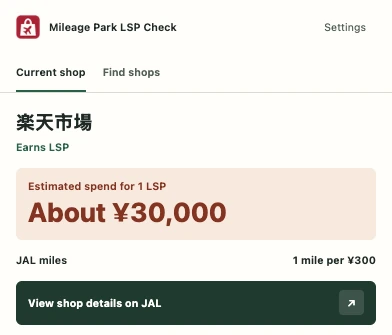
Check earnings before you shop
Open the toolbar popup to see the mileage rate and LSP estimate for the shop you’re visiting.
Get a reminder on eligible shops
Turn on page alerts to see a card in the upper right. Desktop notifications are available in settings, too.
Find shops and continue via JAL
Search for shops, browse new listings and mileage offers, and open the official details on JAL.

Examples of shops with alerts
Shop availability and terms can change. Check JAL for the latest details.
See how it works
Add the extension to Chrome
When the listing goes live, choose “Add to Chrome” in the Chrome Web Store.
Open a participating shop
Click the extension icon. To see a card each time you visit, turn on page alerts in settings.
Start shopping through JAL
Open the shop details from the card, check eligibility and follow the link to the shop from JAL.
Frequently asked questions
How is the LSP estimate calculated?
It estimates the spend needed to earn 100 eligible miles in total. If we can’t confirm whether bonus miles count toward LSP, it uses the base rate.
Why didn’t an alert appear?
Check that page alerts are on and Chrome has granted site access. Alerts appear on supported shops.
Is my current URL sent anywhere?
Shop matching happens in your browser. Your current URL isn’t sent when the extension updates its catalog.